Skip to content
Menu
V5

  • Home
V5

Shipping charge settings in commercebuild v5

By jnunez on July 17, 2026

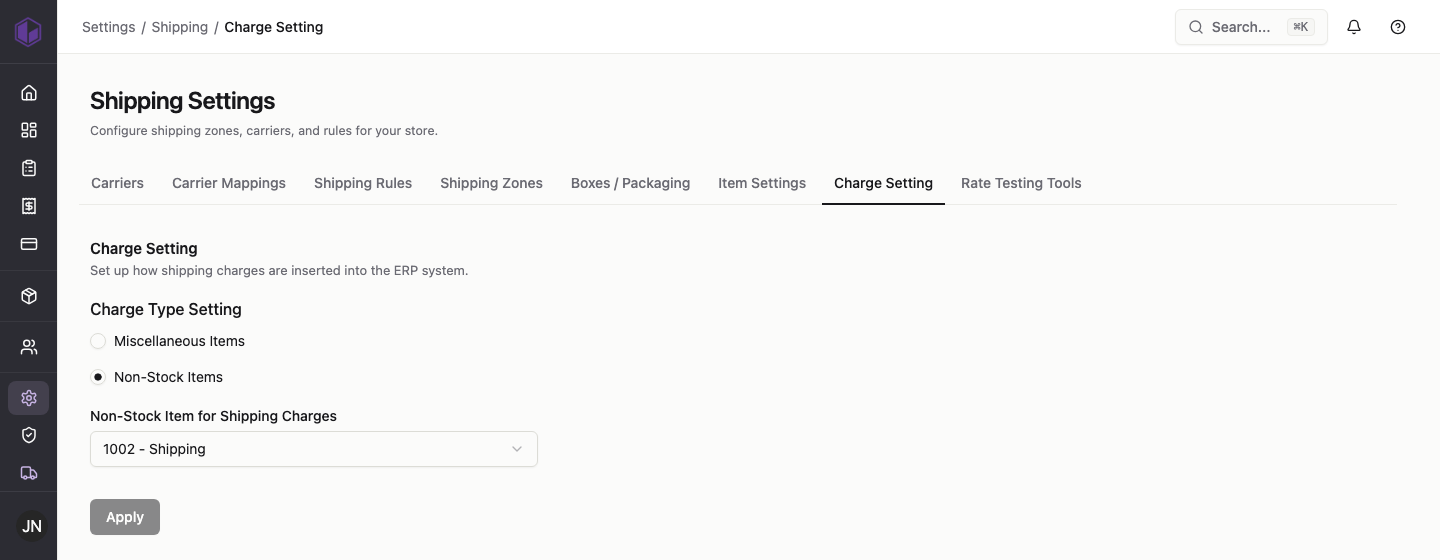
The charge setting controls how the shipping charge on an order is recorded in your ERP.

Steps

  1. Go to Settings › Shipping › Charge Setting.
  2. Choose a charge type: Miscellaneous Items or Non-Stock Items.
  3. If you choose Non-Stock Items, pick the item code used for shipping charges (for example, 1002 – Shipping).
  4. Click Apply.

Shipping charge settings

This is usually set once to match how your ERP is configured. If you’re not sure which option to use, check with whoever manages your ERP.

Category: Shipping

Post navigation

Packaging and item shipping settings in commercebuild v5
Testing shipping rates in commercebuild v5

Related Posts

Setting up shipping zones in commercebuild v5

July 17, 2026
Read More

Shipping settings in commercebuild v5: an overview

July 17, 2026
Read More

Packaging and item shipping settings in commercebuild v5

July 17, 2026
Read More

Categories

  • Catalog
  • Page Editor
  • Payments
  • Promotions
  • Shipping
  • Users
©2026 V5 | WordPress Theme by Superb WordPress Themes